
TABLE OF CONTENTS
- Data entry areas updated:
- Census/NCEA Report Output
- Instructions for schools manually exporting from Gradelink
- Instructions for schools submitting direct to their diocese from Gradelink
Changes for NCEA Data Bank for School Year 2026-2027 collection are live in Gradelink. Some changes include new or updated fields administrators should review before downloading school census data or submitting it to your diocesan portal.
Data entry areas updated:
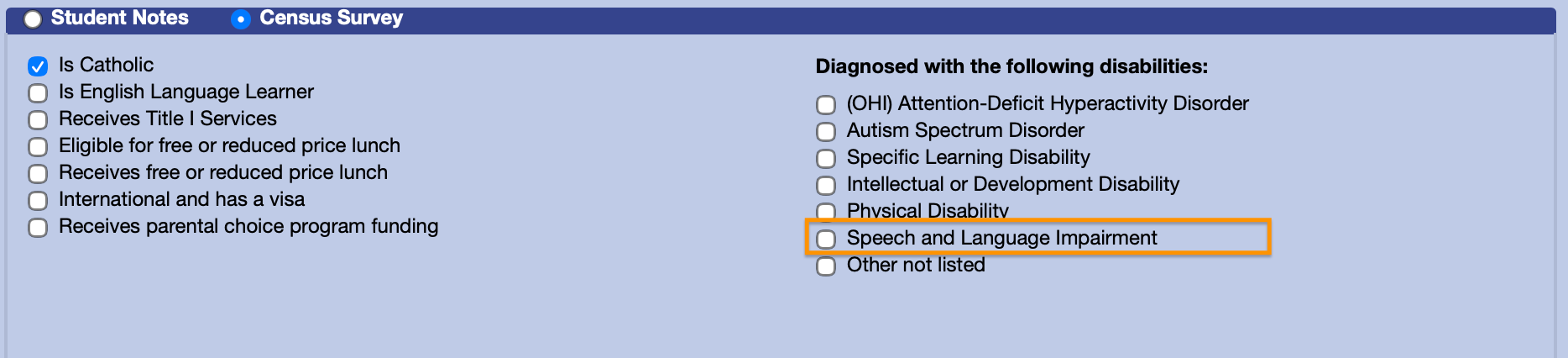
Students > Main > Demographics > Census Survey
New or clarified disabilities:
Attention-Deficit Hyperactivity Disorder - has the following explanation:
A neurodevelopmental disorder characterized by persistent patterns of inattention, hyperactivity, and/or impulsivity that interfere with daily functioning and development.
NEW FIELD: Speech and Language Impairment - has the following explanation:
Speech or language impairment refers to communication disorders that affect speech sound production, fluency, voice quality, or language development, making it challenging for individuals to express themselves effectively.
Other not listed - has the following explanation:
including but not limited to, orthopedic visual, deafness, hearing impairment, traumatic brain injury, and/or emotional disturbance.
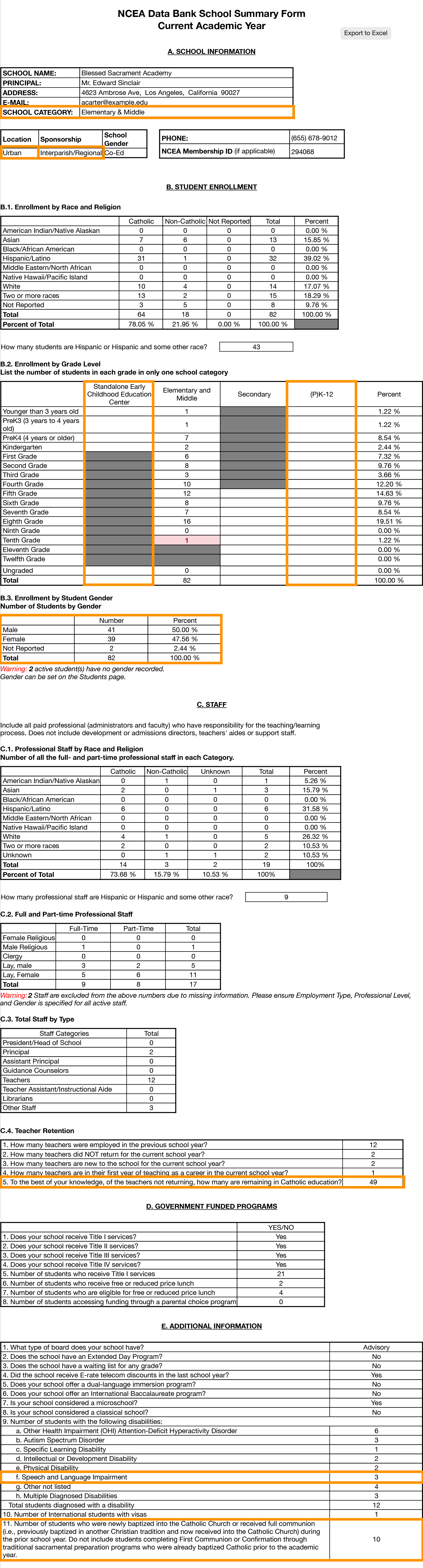
A new section on the report lists Enrollment by Student Gender. Simply ensure Gender is specified on the Students page if not already.
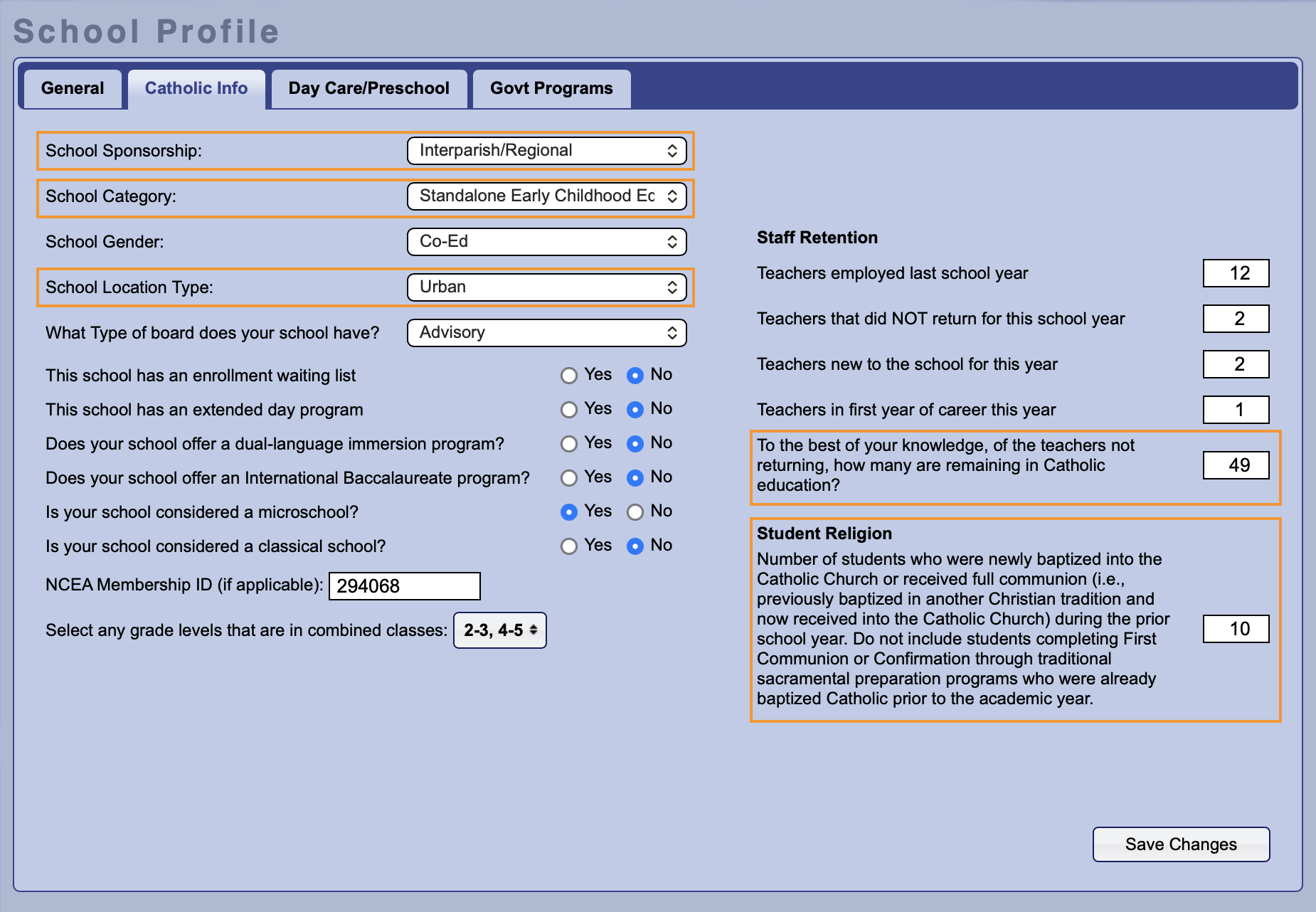
Settings > School Profile > Catholic Info
School Sponsorship: Interparish has been relabelled to Interparish/Regional.
School Category: New options added, “Standalone Early Childhood Education Center” and “(P)K-12”.
School Location Type: “Inner-City” has been removed as a location. Any schools with this designation were changed to “Urban”
NEW FIELD: Staff Retention: To the best of your knowledge, of the teachers not returning, how many are remaining in Catholic education?
NEW FIELD: Student Religion: Number of students newly baptized into the Catholic Church or received full communion [...]
Census/NCEA Report Output
On the NCEA Report output, available in most schools through Administrator Reports > NCEA Report, these new and updated fields are reflected. (For schools using Gradelink LE simply click the Census tab)
Instructions for schools manually exporting from Gradelink
After verifying data is correct, administrators can click the Export to Excel button. The "Data Only" portion of the NCEA School Data Bank sheet will be downloaded which can be sent to the diocese office.
Instructions for schools submitting direct to their diocese from Gradelink
At the bottom of the report, administrators can check the confirmation/certification of review checkbox, and click Submit Census Data.

While updating data, schools can update the Submission Status at the top of the report to "In Progress" to signal to their progress to the diocesan office of Catholic schools. Schools needing assistance from diocese staff can update their submission status at the top to "Need Assistance", and optionally enter a question or topic which will be seen by diocese staff who can further assist.
